
|
Published on:
July 23, 2026
|
Published on:
July 23, 2026
4 Crucial Steps for Effective Restaurant Pickup Implementation
Learn the 4 crucial steps for successful restaurant pickup implementation. Improve online ordering, reduce friction, optimize pickup experiences, and boost customer satisfaction with smarter workflows.
Tillster’s 2026 survey data shows that nearly half of diners (47%) now prefer purchasing directly from restaurants to avoid expensive delivery markups, signaling a major shift in consumer behavior. Many see pickup as the smarter middle ground between convenience and cost savings.
This creates a significant opportunity for restaurant operators. Pickup allows brands to meet growing demand for convenience while preserving margins, retaining ownership of the customer relationship, and reducing dependence on third-party apps.
However, many operators still treat pickup as a secondary fulfillment option rather than a core guest experience.
Pickup is a customer journey in its own right—one that deserves the same level of attention as delivery or dine-in. Success comes from being deliberate about the ordering flow, so the experience feels intuitive from start to finish.
In this blog, we show you how to design a pickup experience that feels effortless to your guests and your teams.
Step 1: Start strong with the first touchpoint
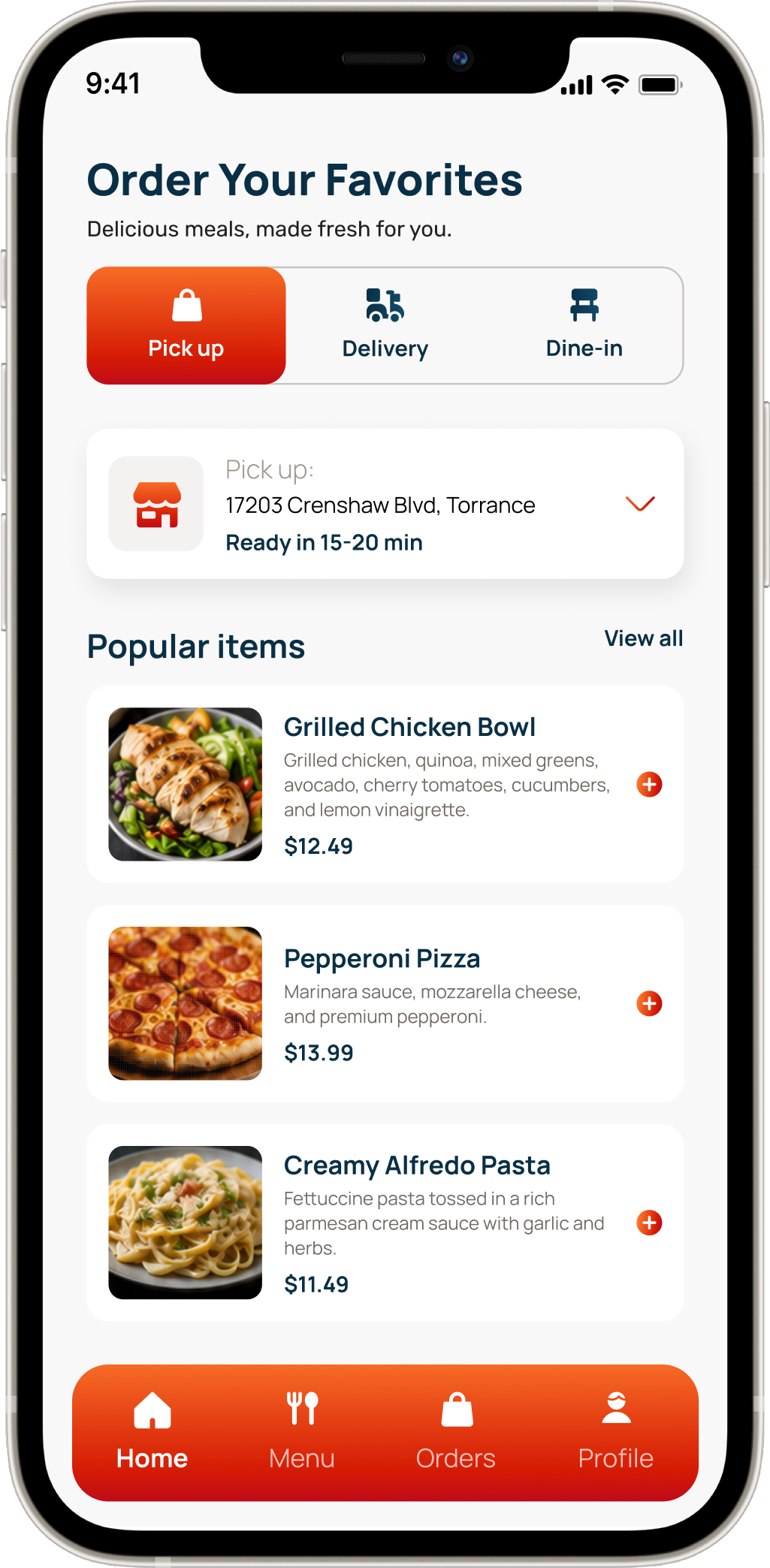
The first moments inside your app or website are critical. If customers struggle to find the right location or choose a fulfillment method, friction can stop them dead in their tracks.
The digital ordering experience should make three things easy:
- Finding the right location
- Choosing a fulfillment method
- Selecting pickup timing
Start by making it easy for guests to choose their store. Aside from having a robust UI, many operators also choose to implement an auto-localization feature to help speed up the process.
Modern ordering platforms can use device GPS to surface the nearest pickup locations, allowing guests to find the right store instantly instead of manually searching or entering addresses. Auto-localization reduces mistakes and speeds up the ordering journey, especially for guests ordering on the go.
Next, make fulfillment options explicit and flexible. Guests increasingly expect choices that fit their routines, whether that's traditional in-store pickup, curbside service, or drive-thru pickup. The experience should make these options obvious and easy to select—not buried inside multiple screens or settings.
Timing flexibility matters too. Some guests just want their food as quickly as possible; others plan lunch in advance or place orders for later in the evening. Supporting both ASAP fulfillment and scheduled orders gives customers control over their experience and aligns expectations before the kitchen ever begins preparation.
Promise times should also adapt dynamically based on current demand and prep requirements so guests receive realistic pickup estimates.
Step 2: Protect the promise
Once an order is placed, the focus shifts from getting guests through the ordering process to delivering on the expectations you just set.
During lunch rushes and other peak periods, digital orders often arrive in unpredictable bursts. Without systems that actively manage incoming order flow, teams can quickly become overwhelmed. Orders stack up, staff scramble to keep pace, and promised pickup times begin to lose credibility.
A well-orchestrated pickup operation should make three things possible:
- Routing orders directly into kitchen operations
- Adjusting pickup timing based on real-time demand
- Protecting kitchen capacity during peak periods
If you’re taking customer orders from multiple channels (direct and third-party), you need to eliminate the chaos of staff wandering from tablet to tablet to manually re-key digital orders into the register.
You need a tool that will help you consolidate incoming orders, pulling them from every digital channel into a single feed and injecting them directly into your POS system in real time. This routes the tickets straight to the kitchen, replaces manual entry, and drastically reduces the risk of human error or lost tickets during busy rushes.
Next, you need a way of adjusting prep and pickup times. Many restaurateurs opt to use pacing tools that continuously monitor kitchen demand and adjust fulfillment timing accordingly. These systems dynamically calculate realistic promise times based on current order volume and item complexity. Some operators may choose to temporarily limit lower-priority channels until the kitchen catches up with tickets.
For example, to protect their fulfillment promise from unpredictable bursts of digital orders, Wingstop implemented a “Smart Kitchen" management system. By replacing chaotic, manual paper tickets with a centralized digital routing system, they gave their kitchen better visibility and control over incoming demand. This orchestrated flow helped cut their average ticket times from 20 minutes down to 10 minutes, allowing them to confidently handle high-volume rushes without overwhelming their staff.
Step 3: Provide visibility
Did the order go through? Is it being prepared? Will it actually be ready on time?
For guests, the time between placing an order and arriving at the restaurant can feel like a black box.
When guests know exactly what is happening, they spend less time wondering where their order is and more time feeling confident that they made the right choice.
Guests should never have to wonder:
- If their order has gone through to your restaurant
- If their order is being prepared or if it’s delayed
- What happens when they come to pick up their food
The process should start with immediate confirmation. Guests should receive an automated receipt and clear pickup instructions as soon as an order is placed. Beyond confirming payment, these messages should answer practical questions upfront: Where should they park? Which entrance should they use? Is pickup happening at the counter, curbside, or through a dedicated lane?
From there, status updates become critical. SMS messages, push notifications, and in-app tracking should provide visibility as orders move through stages like Received, In Prep, and Ready for Pickup.
Arrival awareness adds another layer of convenience. Curbside check-in, geofencing, and arrival notifications can help restaurants recognize when guests are approaching or have arrived, allowing teams to coordinate handoffs more efficiently.
When these guest signals connect directly to operations, staff gain better visibility into timing and arrivals, reducing bottlenecks and improving handoffs.
For example, to eliminate the "black box" of waiting, Domino’s recently upgraded its iconic Tracker with a custom AI-tracking engine that analyzes real-time inputs from team members to provide highly precise estimates. This update allows iOS users to receive "Live Activities" updates directly on their phone's lock screen, meaning they don't even have to open the app to know what is happening. Customers can see the exact minute their order is placed in the oven and track its progress step-by-step, reducing uncertainty from the fulfillment process.
Step 4: Perfect the hand-off
Even when ordering and fulfillment go smoothly, the pickup experience can still break down in its final moments. Guests arrive expecting a fast, seamless handoff—but too often encounter crowded lobbies, unclear instructions, or employees fielding the same question over and over: “Is my order ready yet?”
The handoff should feel like a continuation of the pickup journey, not a disruption to it.
A frictionless handoff experience should:
- Show guests when orders are ready
- Provide dedicated spaces for pickup
- Guide guests through the process clearly
Many brands now create dedicated pickup zones designed to separate digital traffic from traditional ordering flows. Pickup shelves, designated counters, curbside staging areas, and smart lockers all serve the same purpose: helping pickup guests retrieve orders without competing with walk-in customers for attention.
Visibility also plays an important role. Customer-facing order displays can help guests track progress and know exactly when an order is ready, reducing uncertainty and minimizing interruptions for staff.
Clear traffic flow matters too—nobody wants to have to wander around a crowded restaurant or wait in a long line for their pickup order. Use directional signage, designated pickup areas, and intuitive layouts to help guests navigate independently and reduce congestion during busy periods.
Behind the scenes, operational tools and workflows help ensure orders are assembled accurately and staged correctly before they ever reach the pickup area.
For example, to ensure a fast, seamless handoff, Chipotle has physically modified its store designs by adding "Chipotlanes." These are dedicated drive-thru lanes strictly reserved for digital order pickup. To support this physical infrastructure behind the scenes, the brand generalized the "expeditor" position across its system. By dedicating specific staff members to manage the final assembly, routing, and handoff, Chipotle increased its throughput and eliminated guest confusion during peak hours.
Conclusion
Guests seldom think about kitchen pacing, order routing, or fulfillment logic. They will remember whether they walked in, found their order immediately, and walked out feeling like pickup was as convenient as promised. Delivering that effortless experience requires thoughtful implementation and a way of connecting your digital storefronts directly to your back-of-house operations.
By carefully orchestrating the entire journey—from the first click to the final physical handoff—you can protect your kitchen's rhythm while driving high-margin growth.
Learn more about how Tillster's unified restaurant ordering platform can help you master the pickup experience.
Popular Blogs

Pickup implementation FAQs
How has the demand for pickup reshaped the restaurant industry?
Pickup and takeout shifted from a nice-to-have to a core revenue stream after the pandemic accelerated digital ordering habits across the restaurant industry. Off-premise orders are now a default for many guests rather than a fallback to dine-in.
For operators, that shift is a chance to meet demand for convenience while protecting margins and keeping ownership of the customer relationship.
How can restaurant owners improve the online ordering experience for pickup?
The first touchpoint matters most. A good online ordering system should make three things effortless: finding the right location, choosing a fulfillment method, and selecting pickup timing.
Features like GPS-based auto-localization surface the nearest store instantly, while clear fulfillment choices and flexible payment options give guests a fast, frictionless checkout before the kitchen even begins prep.
How do restaurants keep wait times accurate during busy rushes?
Accurate wait times depend on actively managing order flow rather than reacting to it.
Pacing tools continuously monitor demand and calculate realistic promise times based on current volume and menu item complexity. Routing pickup orders from every channel into a single feed that feeds directly to the POS also helps streamline front-of-house and back-of-house coordination and prevents the chaos of re-keying tickets.
Why are more customers choosing pickup orders over delivery services?
Cost is the biggest driver. Recent Tillster survey data shows that 47% of diners now prefer ordering directly from restaurants to avoid the expensive markups tacked on by third-party food delivery.
Food pickup has become the practical middle ground that gives guests the convenience of takeout without the added fees, which protects a restaurant's bottom line and reduces its dependence on outside apps.
What's the best way to offer curbside pickup without creating confusion?
Restaurant curbside pickup works best when guests know exactly what to expect. Order confirmations should answer practical questions upfront, such as where to park and which entrance or lane to use.
Pairing that with arrival awareness tools like geofencing and check-in notifications lets staff coordinate a smooth, contactless handoff, so a restaurant's pickup service stays seamless from the parking lot to the window
What makes a great pickup experience that boosts customer satisfaction?
A great pickup customer experience feels effortless from the first click to the final handoff. That means clear order visibility through status updates (Received, In Prep, Ready for Pickup), dedicated pickup zones that keep digital traffic separate from walk-in dine-in customers, and intuitive signage that guides guests without staff intervention.
When the entire online ordering system connects to operations this way, customer satisfaction naturally follows, because guests walk in, grab their order, and leave feeling that pickup was exactly as convenient as promised.